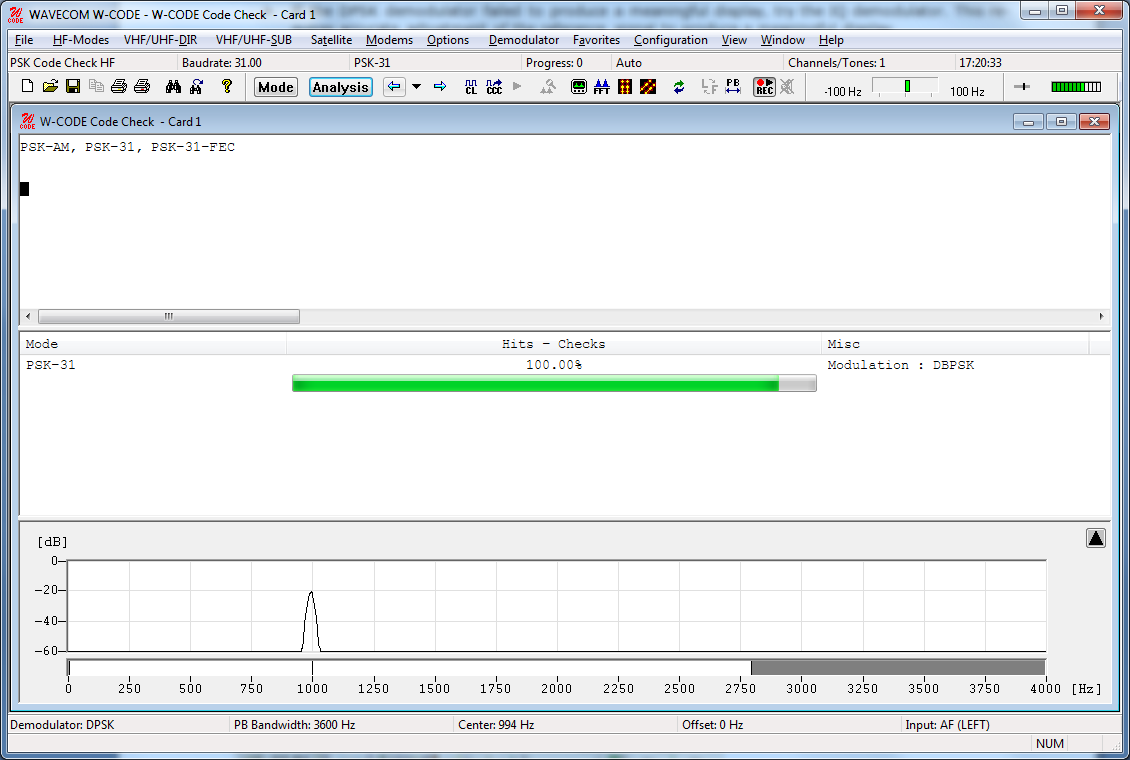
PSK code check is started by selecting the PSK Code Check button or from HF-Modes | Analysis | PSK Code Check.
The PSK code check is initialized with default values. In many cases the user needs to set up the following values:
Ø center frequency
Ø baudrate
Ø number of channels
Ø bandwidth (use the pb tuning to enter the correct bandwidth
The center frequency can be set by using the cursors in the FFT Window as shown below, or by selecting Center in the Demodulator menu. The baud rate can also be configured.
The number of channels is set to one for all single channel modes and to two for two channel modes like PACTOR II/II-FEC. Modes with more than one channel need the shift settings in addition to the center frequency.
Note: The accuracy of the center frequency and shift settings is very important and directly influences the performance of the decoding.
After each configuration change, the PSK code check automatically restarts with the new values. The values of these parameters are displayed in the appropriate fields after the setting has completed.
If two or more different systems are identified, or if more than five proven transmission errors occur, an automatic switch to a mode will not take place.
The software then proceeds with code and system analysis. The incoming bit stream is tested and compared against known PSK modes.
The name of each identified system is displayed in the output window. An identified system may be immediately started by double-clicking the system in the output window – for instance double-clicking PSK-31 in the figure above will interrupt PSK code checking and immediately start PSK-31.
Hits-Checks shows how many times a mode was successfully identified during the code check. If multiple modes are listed, the mode with most hits should be tried first.
Some modes are very difficult to distinguish, especially when the system is in idle mode.